Interwell Health
What is Interwell Health?: Cricket Health merged along with a portion of Fresenius Medical Care and Acumen to create Interwell Health, a larger company focused on value-based Kidney Care for people with CKD and ESKD.
Remote Case Management: Baseline Needs Assessment Redesign
The Problem: The existing case review and assessment workflow required Remote Case Managers (RCMs) to navigate through multiple screens, tabs, and “next” buttons to access and complete assessment questions and recommendations. Interventions were hidden behind separate flows, making it difficult to recommend a single action quickly and efficiently.
Goal: Increase efficiency in case management workflows by reducing time spent per case and on the assessment. In the pre redesign state, Case Managers were accomplishing around 2.6 cases per hour, and spending about 20 minutes per case on a good day, which was reported by the manager for the RCMs.
How might we streamline the assessment experience so RCMs can review more cases, reduce effort, and improve member outcomes?
DISCOVER
Methodologies: User Research: Shadowing, Journey Mapping
The FKC RCM team is responsible for reviewing member cases and recommending interventions based on individual needs. However, the existing process within Salesforce was time consuming, fragmented, and difficult to navigate, which was limiting the number of cases the RCMs could complete in a day.
This project focused on redesigning the Baseline Needs Assessment, including the creation of the case within Salesforce, to improve efficiency and enable faster, more effective decision making while on the call with the patient.
To understand the problem, I first shadowed RCMs to document their case reviews and what steps they took.

DEFINE
I consolidated my findings into a User Journey Map which had:
- Actions taken
- Screenshots of each step
- Pain points and blockers
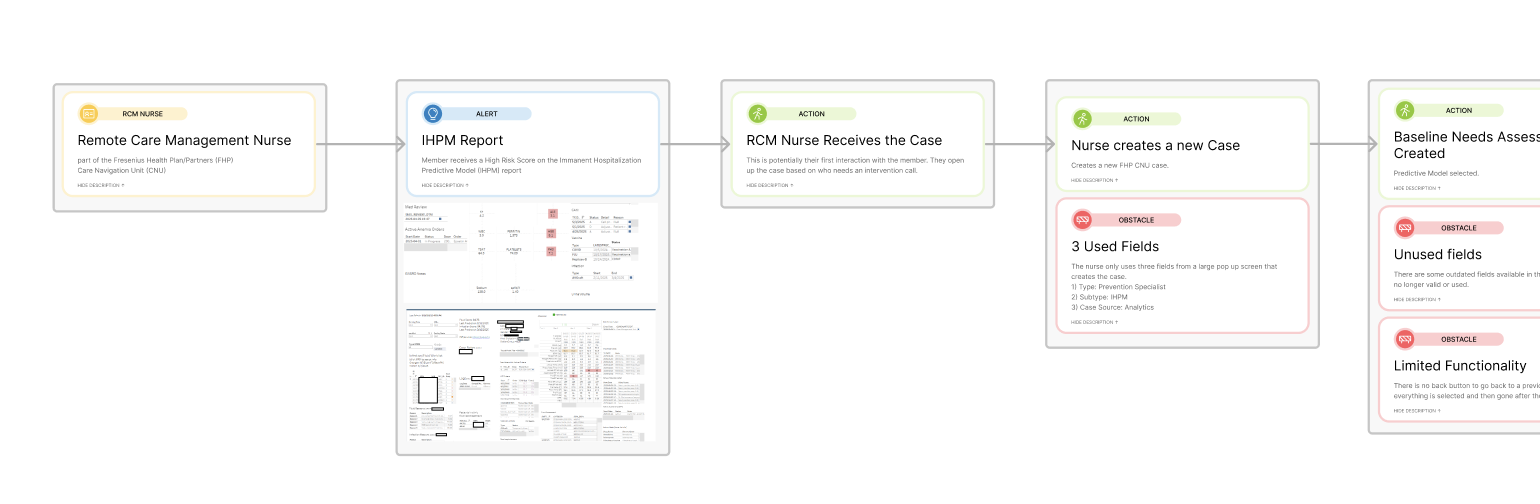
Key Insights:
- The assessment flow was fragmented across multiple pages and tabs
- RCMs had to repeatedly click “next”, increasing time and frustration
- Interventions were isolated behind separate actions, disrupting their workflow
- Assessment questions were outdated and not always relevant
- Upon creating the case, there were too many options
DESIGN
To redesign this process, I had to take into consideration of the constraints that were specific to this workflow:
It was built within Salesforce, a highly structured system.
Limited flexibility required working with:
- Existing components
- Select custom code integrations that weren't too out of the box
Design decisions balanced usability improvements with platform limitations.
My first step was to design a single, unified assessment form, getting rid of the step by step questionnaire and links to open tabs within a case. I used conditional "waterfall" logic, where the questions dynamically appeared based on previous answers. It would eliminate irrelevant fields and keep the interface clean and focused. I reduced the amount of clicks, and removed unnecessary “next” buttons and steps. This minimized tab switching within Salesforce and streamlined access to recommendations, no longer opened seperately.
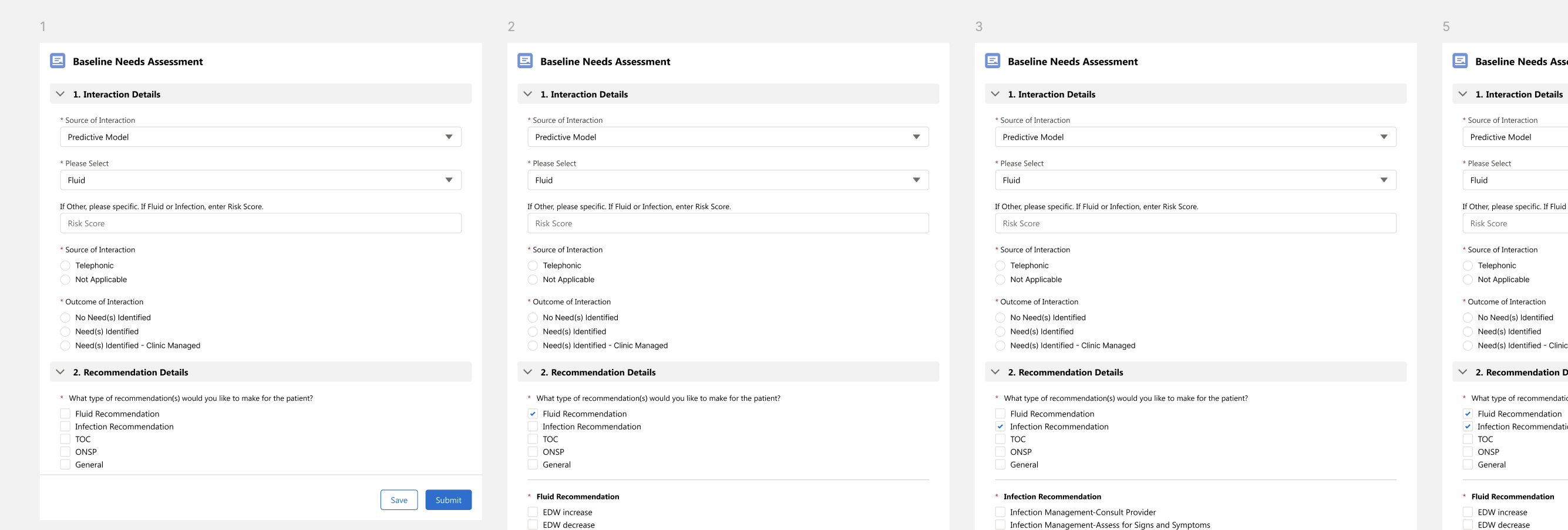
I also refreshed outdated questions given to me by the RCM managers and those who decided what recommendations and options were to be given, which ensured alignment with current member needs and workflows.
Outcomes
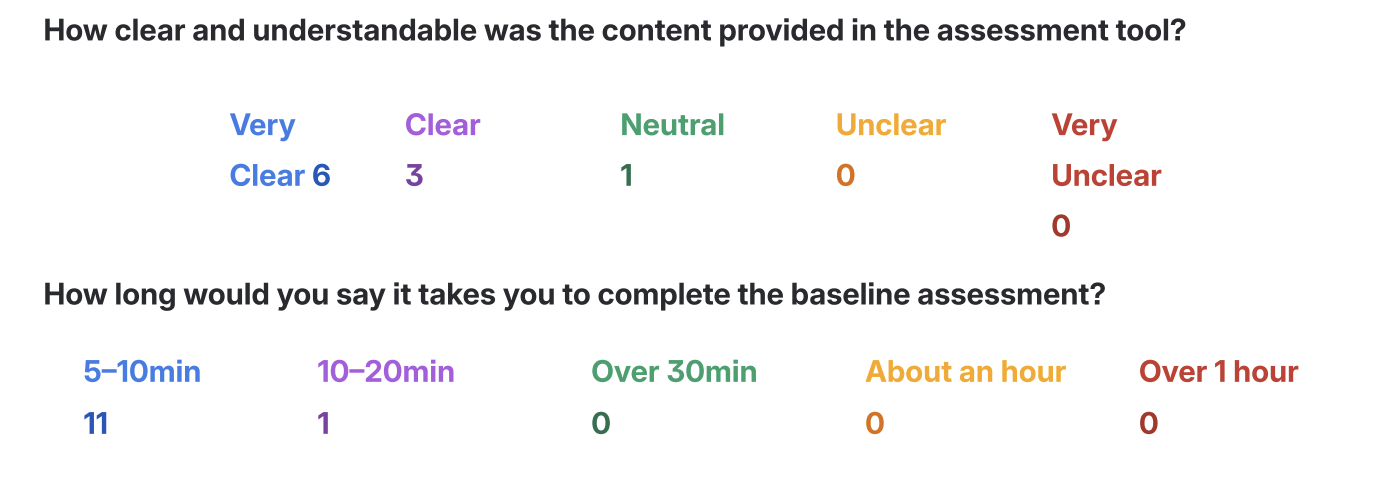
The post launch survey results showed significant improvements in completion time:
- Before: ~20 minutes per assessment
- After:
- 11 users (92%) reported 5–10 minutes
- 1 user (8%) reported 10–20 minutes
This represents an estimated 50–75% reduction in time per assessment.
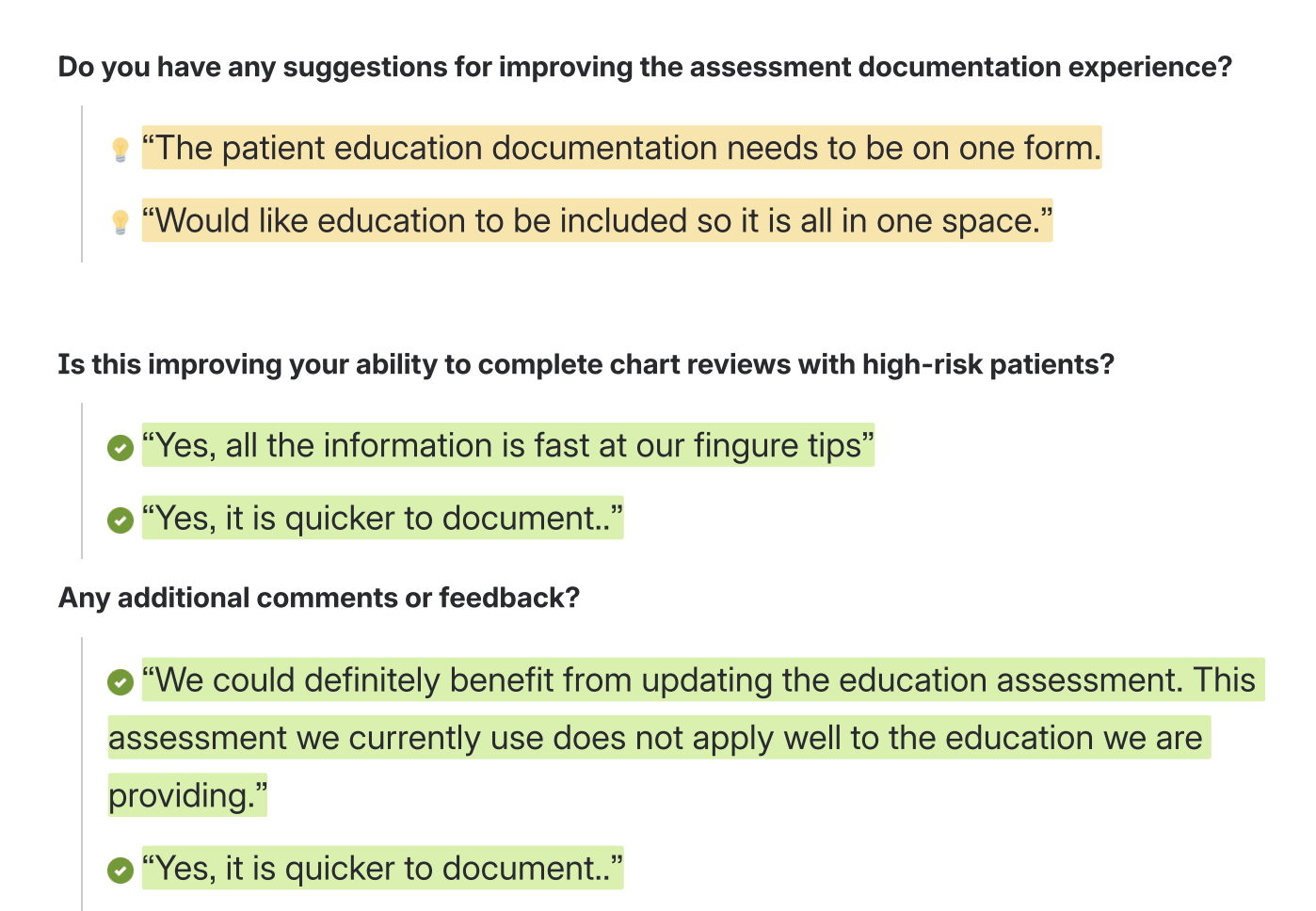
We also gathered qualitative written feedback, which gave us insight into the next part of this workflow that I was to redesign in the next few quarters (the education assessment portion).
Goals & Impact
- RCMs can now review more cases per hour
- There was a 33% increase in completing cases, not just the baseline assessment.
- Reduced clicks and navigation improve workflow speed
- Lower cognitive load enables better focus on member needs
Overall User Satisfaction
- We used a CSAT scoring for the survey, which is: a Customer Satisfaction (CSAT) survey is a tool used to measure how happy customers are with a specific business product, service, or interaction. It typically asks a single question, such as "How satisfied were you with this experience?", using a rating scale of 1–3, 1–5, or 1–10 to capture immediate feedback and calculate a percentage score.
- CSAT score: ~100 (n=20).
- This survey received strong qualitative feedback around ease of use and efficiency and a 100 scoring.
Next Steps
This project highlighted for me the importance of designing for real workflows within constrained systems. Rather than layering on new features, the biggest impact came from:
- Reducing unnecessary steps to remove friction between the tool (Salesforce) and the user (Case Managers)
Future iterations will focus on expanding these improvements into the education assessment and collaboration card within the FKC RCM case in Salesforce, continuing to optimize the end to end RCM experience.